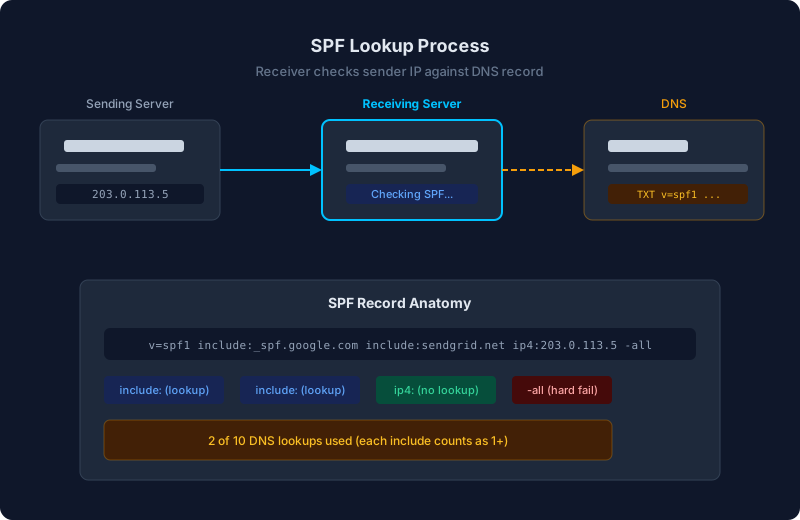
What is the SPF lookup limit?
SPF records have a hard limit of 10 DNS lookups. Every include:, a:, mx:, and redirect= mechanism counts toward this limit. Nested includes count too.
If your record exceeds 10 lookups, receivers return a permerror. SPF fails for every message, regardless of whether the sender is legitimate.
What counts as a lookup?
These mechanisms require DNS queries and count toward the limit:
include:counts as 1, plus any lookups inside the included recorda:counts as 1mx:counts as 1, plus 1 for each MX record resolvedredirect=counts as 1exists:counts as 1
These do not count:
ip4:andip6:(no DNS query needed)all(catch-all, no query)
How to count your lookups
Check your current SPF record and count manually, or use a tool. Here is an example that looks simple but uses 7 lookups:
v=spf1 include:_spf.google.com include:sendgrid.net include:servers.mcsv.net mx -allinclude:_spf.google.com= 1 + 3 nested = 4include:sendgrid.net= 1 + 0 nested = 1include:servers.mcsv.net= 1 + 0 nested = 1mx= 1
Total: 7 lookups. Add two more services and you hit the limit.
How to fix it
1. Remove unused includes
Check each include against your actual senders. If you stopped using a service, remove its include. This is the easiest win.
2. Replace includes with ip4/ip6
If a service sends from a small, stable set of IPs, replace the include with direct IP entries. This removes the DNS lookup entirely. The downside: you need to update your record if the provider changes their IPs.
# Before (1+ lookups)
include:mail.example.com

# After (0 lookups)
ip4:198.51.100.0/24 ip4:203.0.113.5
3. Remove the mx mechanism
The mx mechanism resolves your MX records to IPs, costing 1+ lookups. If your mail server IPs are already covered by an include or ip4 entry, you can safely remove it.
4. Use SPF flattening
SPF flattening resolves all includes to their underlying IP addresses at publish time, replacing nested lookups with direct ip4/ip6 entries. Tools can automate this and re-publish when provider IPs change.
The risk: if a provider adds new IPs and your flattened record is not updated in time, their email will fail SPF. Only use flattening with automated re-publishing.
5. Rely on DKIM instead of SPF for some senders
DMARC passes if either SPF or DKIM passes with alignment. If a third-party sender supports DKIM signing with your domain, you may not need their SPF include at all. Configure DKIM for the sender and remove the include to save lookups.
How to prevent this problem
- Audit before adding. Check your lookup count before adding a new service. If you are at 9, you need to optimize before adding another include.
- Prefer DKIM for third-party senders. DKIM does not have a lookup limit. Configure DKIM signing for each service and only add SPF includes when necessary.
- Monitor your SPF record. Providers occasionally add nested includes to their own records, which increases your count without you changing anything.