What is DKIM?
DKIM (DomainKeys Identified Mail) is an email authentication method that uses cryptographic signatures to verify two things: that the email was sent by an authorized system, and that the message was not modified in transit.
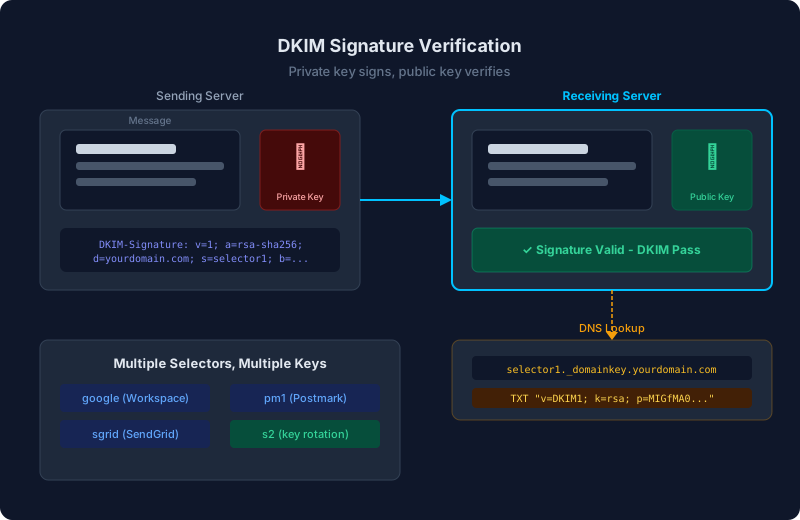
Unlike SPF, which checks whether a sending IP is authorized, DKIM works at the message level. The sending server signs the email with a private key, and the receiving server verifies that signature using a public key published in DNS.
How does DKIM signing work?
When an email is sent from a DKIM-enabled server, the process works like this:
- The sending server selects specific headers and the body of the email to sign.
- It creates a hash of this content and encrypts it with the domain's private key, producing a cryptographic signature.
- The signature is added to the email as a
DKIM-Signatureheader.
Here is what a DKIM-Signature header looks like:
DKIM-Signature: v=1; a=rsa-sha256; d=yourdomain.com;
  s=selector1; c=relaxed/relaxed;
  h=from:to:subject:date:message-id;
  bh=base64encodedBodyHash;
  b=base64encodedSignature
How does DKIM verification work?
When the receiving server gets the email, it:
- Extracts the
d=(domain) ands=(selector) values from the DKIM-Signature header. - Queries DNS for a TXT record at
selector._domainkey.yourdomain.com. - Uses the public key from that DNS record to decrypt the signature and verify it matches the hash of the signed headers and body.
If the signature matches, DKIM passes. If the content was altered in transit, the hash will not match and DKIM fails.
What is a DKIM record?
A DKIM record is a DNS TXT record that contains the public key used to verify signatures. It is published at a specific location determined by the selector:
selector1._domainkey.yourdomain.com TXT "v=DKIM1; k=rsa; p=MIGfMA0GCS..."The record fields:
- v=DKIM1 identifies this as a DKIM record
- k=rsa specifies the key type (RSA is most common)
- p=... contains the base64-encoded public key
What are DKIM selectors?
A selector is a label that identifies which DKIM key pair was used to sign an email. The same domain can have multiple selectors, each pointing to a different public key. This is useful for:
- Multiple senders: Google Workspace might use
google, while SendGrid usessgrid. Each has its own key pair. - Key rotation: You can publish a new key with a new selector before retiring the old one, avoiding any downtime.
Common selector names include google, selector1, s1, and k1. Each email service chooses its own selector names.
How do third-party senders handle DKIM?
When you use a third-party email service (SendGrid, Mailchimp, Postmark, etc.), they need to sign emails with a DKIM key that is associated with your domain. There are two approaches:
- CNAME delegation: The provider asks you to create a CNAME record at
selector._domainkey.yourdomain.comthat points to their DNS. They manage the key. This is the most common approach. - Direct key publishing: The provider generates a key pair and gives you the public key to publish as a TXT record in your DNS. You manage the DNS entry, they sign with the private key.
Without this setup, the provider will sign with their own domain (like d=sendgrid.net), which means DKIM passes but DKIM alignment for DMARC fails because the signing domain does not match your From domain.
How does DKIM relate to DMARC?
For DMARC purposes, DKIM alignment means the d= value in the DKIM-Signature header must match the From domain.
In relaxed alignment (the default), the organizational domains need to match. An email from user@yourdomain.com signed with d=mail.yourdomain.com passes relaxed DKIM alignment.
DKIM alignment is often more reliable than SPF alignment for third-party senders. While many services use their own Return-Path (breaking SPF alignment), most support signing with your domain via CNAME delegation (enabling DKIM alignment). This is why properly configuring DKIM for every third-party sender is critical for DMARC.
Common DKIM mistakes
- Not configuring DKIM for third-party senders. If a service sends email as your domain without your DKIM key, DKIM alignment will fail. Check each provider's documentation for DKIM setup instructions.
- Using weak keys. RSA keys should be at least 1024 bits, and 2048 bits is recommended. Some older configurations use 512-bit keys, which are considered insecure.
- Never rotating keys. DKIM keys should be rotated periodically. Use selectors to make rotation seamless: publish the new key, switch the signing config, then remove the old key after a transition period.
- Signing the wrong headers. At minimum, the From, To, Subject, Date, and MIME-Version headers should be signed. Most email services handle this correctly, but custom setups sometimes miss important headers.
- Breaking signatures with email forwarding. DKIM signatures can break when emails are forwarded and the content is modified. This is a known limitation, and it is one reason DMARC requires only one of SPF or DKIM to pass (not both).