What is SPF?
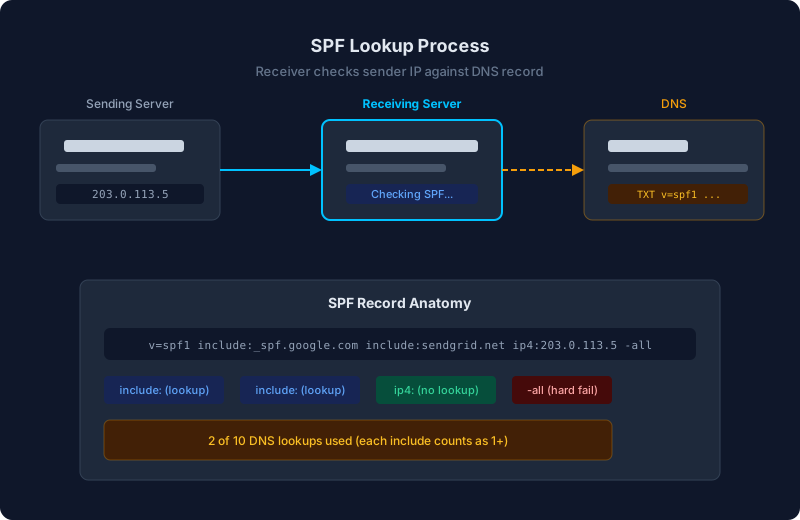
SPF (Sender Policy Framework) is a DNS-based email authentication method. It lets a domain owner publish a list of IP addresses and servers that are authorized to send email for that domain. When a mail server receives an email, it can check the sender's IP against this list to decide whether to trust the message.
SPF is one of the three pillars of email authentication, alongside DKIM and DMARC. On its own, SPF validates the envelope sender (Return-Path), not the From header. This distinction matters for DMARC alignment, which we will cover later.
How does SPF work?
The SPF verification process has three steps:
- The receiving mail server extracts the Return-Path domain from the incoming email.
- It queries DNS for a TXT record at that domain, looking for one that starts with
v=spf1. - It evaluates the mechanisms in the SPF record against the sending server's IP address. The result is pass, fail, softfail, neutral, or permerror.
What does an SPF record look like?
An SPF record is a DNS TXT record published at your domain. Here is a common example:
v=spf1 include:_spf.google.com include:sendgrid.net ip4:203.0.113.5 -allThis record says: emails from my domain can come from Google Workspace, SendGrid, or the IP address 203.0.113.5. Reject everything else.
Mechanisms
SPF records use mechanisms to define authorized senders:
- ip4: / ip6: Match a specific IP address or CIDR range.
ip4:203.0.113.0/24 - include: Check the SPF record of another domain. Used for third-party services.
include:_spf.google.com - a: Match the IP addresses in the A record of a domain.
a:mail.yourdomain.com - mx: Match the IP addresses of the domain's MX records.
mx - all: Catch-all mechanism, always at the end. Combined with a qualifier to define the default action.
Qualifiers
Each mechanism has a qualifier prefix that determines the result:
- + (pass): Default if no qualifier. The sender is authorized.
- - (fail): The sender is explicitly not authorized.
- ~ (softfail): The sender is probably not authorized. Used during testing.
- ? (neutral): No assertion about the sender.
The most common ending is -all (hard fail, reject unauthorized senders) or ~all (soft fail, mark as suspicious but deliver).
What is the 10-DNS-lookup limit?
SPF has a hard limit of 10 DNS lookups per evaluation. This limit exists to prevent SPF checks from becoming a denial-of-service vector. Every include:, a:, mx:, and redirect= mechanism counts as one lookup. Nested includes count too.
ip4: and ip6: mechanisms do not count because they do not require DNS queries.
If your SPF record exceeds 10 lookups, receivers return a permerror and SPF fails for all messages. This is one of the most common SPF problems, especially for organizations that use many third-party email services.
How does SPF handle third-party senders?
When you use a service like SendGrid, Mailchimp, or HubSpot to send email from your domain, you need to add their sending IPs to your SPF record. Most providers give you an include mechanism to add:
v=spf1 include:sendgrid.net include:servers.mcsv.net -allEach include points to the provider's own SPF record, which lists their current IP ranges. This means the provider can update their IPs without you having to change your DNS.
The challenge is that each include costs one or more DNS lookups. Five third-party services can easily consume all 10 lookups, leaving no room for growth.
How does SPF relate to DMARC?
SPF on its own validates the Return-Path domain, not the From header. DMARC adds an alignment requirement: the Return-Path domain must match the From domain for SPF to contribute to a DMARC pass.
In relaxed alignment mode (the default), the organizational domains need to match. So if your From address is user@yourdomain.com and the Return-Path is bounce@mail.yourdomain.com, that passes relaxed SPF alignment because both share the organizational domain yourdomain.com.
Many third-party senders use their own Return-Path domain by default (like bounce.sendgrid.net), which means SPF will pass but SPF alignment for DMARC will fail. In this case, you need DKIM alignment to pass DMARC instead.
Common SPF mistakes
- Exceeding the 10-lookup limit. Adding too many includes without counting nested lookups. Use an SPF checker tool to count your total lookups.
- Using ~all instead of -all. Soft fail is appropriate during rollout, but leaving it permanently weakens your protection.
- Publishing multiple SPF records. A domain should have exactly one SPF TXT record. Multiple records cause unpredictable behavior.
- Forgetting to update SPF when adding a service. A new email tool that is not in your SPF record will fail authentication for every message it sends.
- Using the deprecated SPF record type. SPF records must be published as TXT records, not the deprecated SPF DNS record type.